
Integrations
Close the deal once, and let it reach everything else on its own
Your sellers should not retype an order into the accounting system, copy an address into a shipping tool, or look up a CVR number by hand. CloudDialer connects to the systems that already run your back office, so a won deal moves to accounting, shipping and the customer without a second entry.
What connects today
Six connections that cover the back office, not a marketplace of hundreds
e-conomic
Two-way accounting sync. Pull your customers, products and invoices in; push customers, drafts and booked invoices back out — with write-back off until you decide to turn it on.
Shipmondo
Shipping and 3PL. A won order becomes a shipment with the right carrier and a normalized delivery address, and tracking flows back to the customer.
CVR
Danish company lookups from cvrapi.dk. Type a CVR number and the legal name, address and company data fill themselves in — no manual transcription.
GatewayAPI
SMS that your rules can send: a quote text, an order pay-link, a shipping notification — triggered by what happens in the pipeline, not by hand.
Resend
Transactional and personal email delivery for quotes, order confirmations, payment links and reminders, sent from your own domain.
Stripe
Payments and pay-links. Send a customer a link by SMS or email and collect the money against the order — checkout handled, status synced back.
The wedge
Connections are only useful when something fires them automatically
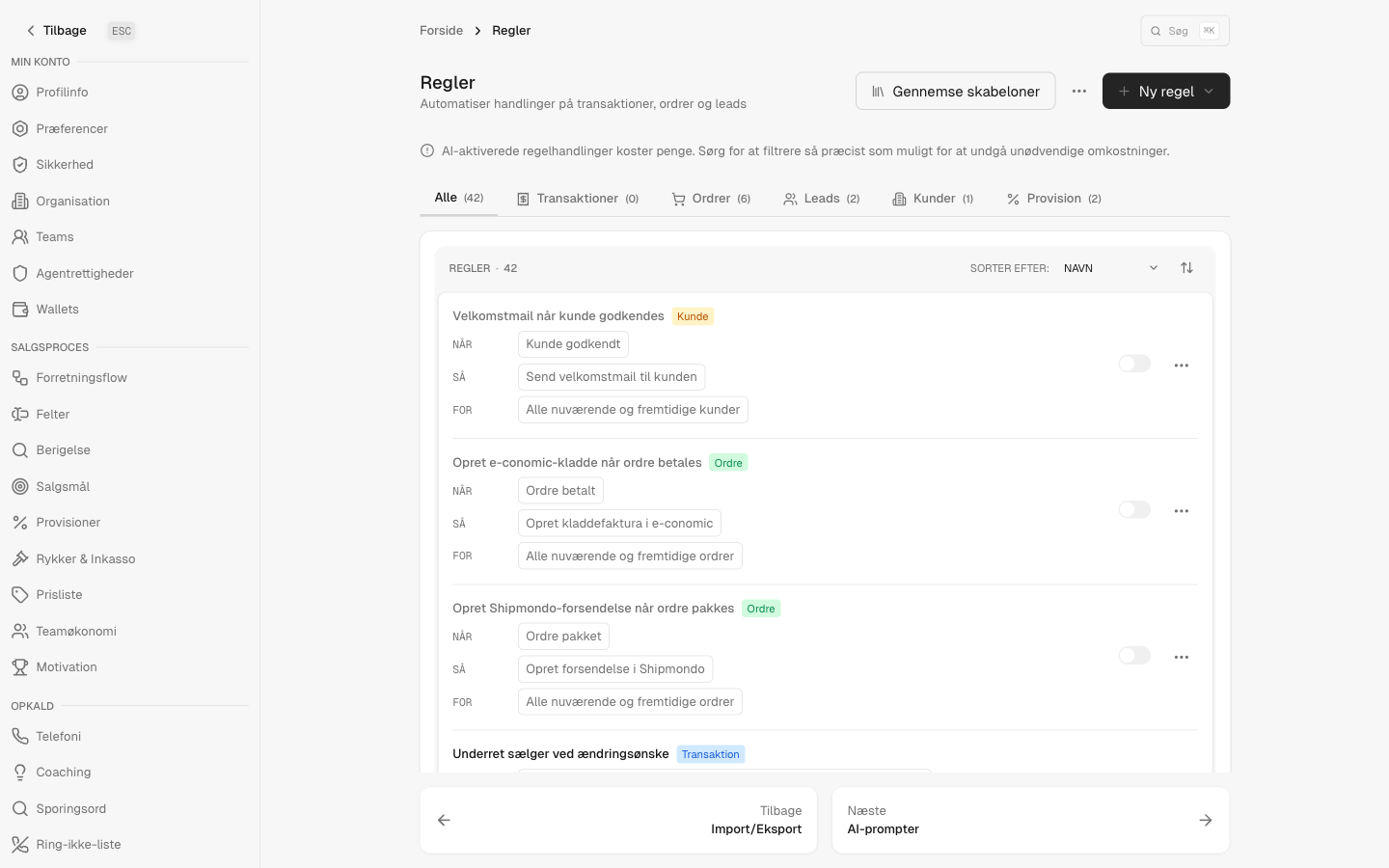
Most tools let you connect an accounting or shipping system and stop there — you still click the buttons. In CloudDialer the Rules engine is where each connection earns its keep. The same rules that move a lead through the pipeline can book an e-conomic invoice, create an e-conomic draft, push a customer to accounting, create a Shipmondo shipment, send a Stripe pay-link, or fire an SMS — the moment the trigger condition is met.
- Book an e-conomic invoice or create a draft as a rule action, not a manual step
- Create a Shipmondo shipment the instant an order reaches the right status
- Send an order pay-link over SMS or email and let Stripe collect against it
- Decide which connection runs, on which trigger, per the way your team sells
How a deal travels
One closed call, four systems updated
The seller wins the deal
On the call, the order is built against the customer — whose CVR lookup already filled the legal name and address when the account was created.
Accounting catches up
Per your rules, the customer and invoice sync to e-conomic. Write-back stays off until you choose to enable it, so nothing posts before you are ready.
The warehouse gets the order
A Shipmondo shipment is created with the right carrier and a clean delivery address, and tracking comes back to the customer.
The customer pays
A Stripe pay-link goes out by SMS or email through GatewayAPI and Resend, and the payment is matched back to the order.
On your terms
Sync that respects your ledger
Accounting is the one place you cannot afford surprises. CloudDialer's e-conomic connection is configurable per entity — customers, products, invoices, credit notes — and write-back is gated behind an explicit switch. You can read everything in while pushing nothing out, then turn on each write only when you trust it. We do not silently post invoices on your behalf.
- Pull-only to start: see your e-conomic data inside CloudDialer with nothing written back
- Per-entity push controls, off by default, that you enable one at a time
- A write gate that checks both 'configured' and 'enabled' before anything leaves CloudDialer
Honest answers about the connections
Does CloudDialer post invoices to e-conomic automatically?
Only if you turn it on. The sync is configurable and write-back is off by default. You can run it pull-only — reading customers, products and invoices in — and enable each write yourself when you are ready.
Is this a marketplace with hundreds of apps?
No, and that is deliberate. We connect the systems a Nordic sales operation actually runs on — e-conomic, Shipmondo, CVR, GatewayAPI, Resend and Stripe — and we make those connections work properly rather than offering a long list that mostly does not.
Who triggers the integrations?
Your rules do. Booking an e-conomic invoice, creating a Shipmondo shipment, sending a Stripe pay-link or an SMS are all available as rule actions, fired by pipeline events you define.
Where does the CVR data come from?
From the public cvrapi.dk service. You enter a CVR number and the company's legal name, address and registration data fill in, so you are not transcribing it from a website.
Can I send payment links by text?
Yes. A Stripe pay-link can go out over SMS via GatewayAPI or by email via Resend, and the payment is reconciled back against the order.
Connect the back office once. Sell without the re-typing.
See your own accounting, shipping and payment tools wired into the pipeline, so a won deal updates everything it touches.